
Machine data collection – how Scout works
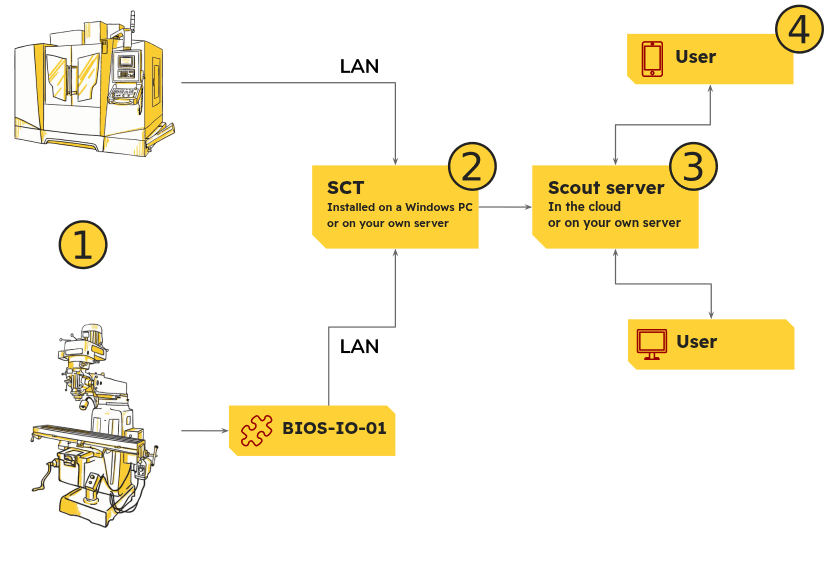
- For CNC and PLC machines, Scout reads data over the LAN, with no electrical modifications. We collect data automatically, straight from the CNC or PLC controller, using dedicated protocols. The machines do not need direct internet access. From conventional machines, signals are collected with the BIOS-IO-01 module.
- On a Windows computer or server acting as a gateway runs our SCT software: a set of console applications that run in the background as Windows services. SCT receives data from all the machines and passes it on to the server over secure HTTPS. We configure SCT remotely, so you do not have to install or set up anything yourself.
- The server hosts the Scout web application (plus databases), which makes it easy to browse machine statistics and reports, send notifications and more.
- In a web browser (on a PC or a mobile device), users see the data received from the machines, statistics, reports and more. No special software is needed on users’ devices or PCs – just a web browser.
Machine data collection in Scout is automatic, with no manual entry. In most cases, to start monitoring CNC machines with Scout, all you need is to connect the machines to a LAN with a Windows PC or server. We set up and configure the Scout Configuration Tool (SCT) on it remotely.
This means you can start the free trial straight away, fully remotely.