
MES ERP integration in Scout works both ways: Scout connects to your ERP, or your ERP connects to Scout through our REST API. Every ERP is different, so we prepare the integration individually for your system.
Why MES ERP integration
Your ERP knows what needs to be done: jobs, deadlines, quantities. Scout knows what is really happening on the machines, because it takes data straight from the control. When the two systems do not talk to each other, someone retypes job numbers on the shop floor, and working times reach the ERP days later, from handwritten notes.
MES ERP integration removes that retyping. The operator selects a job from a list instead of typing it in, and the planner sees the real machine working times in the ERP instead of assumed ones.
Two directions of MES ERP integration
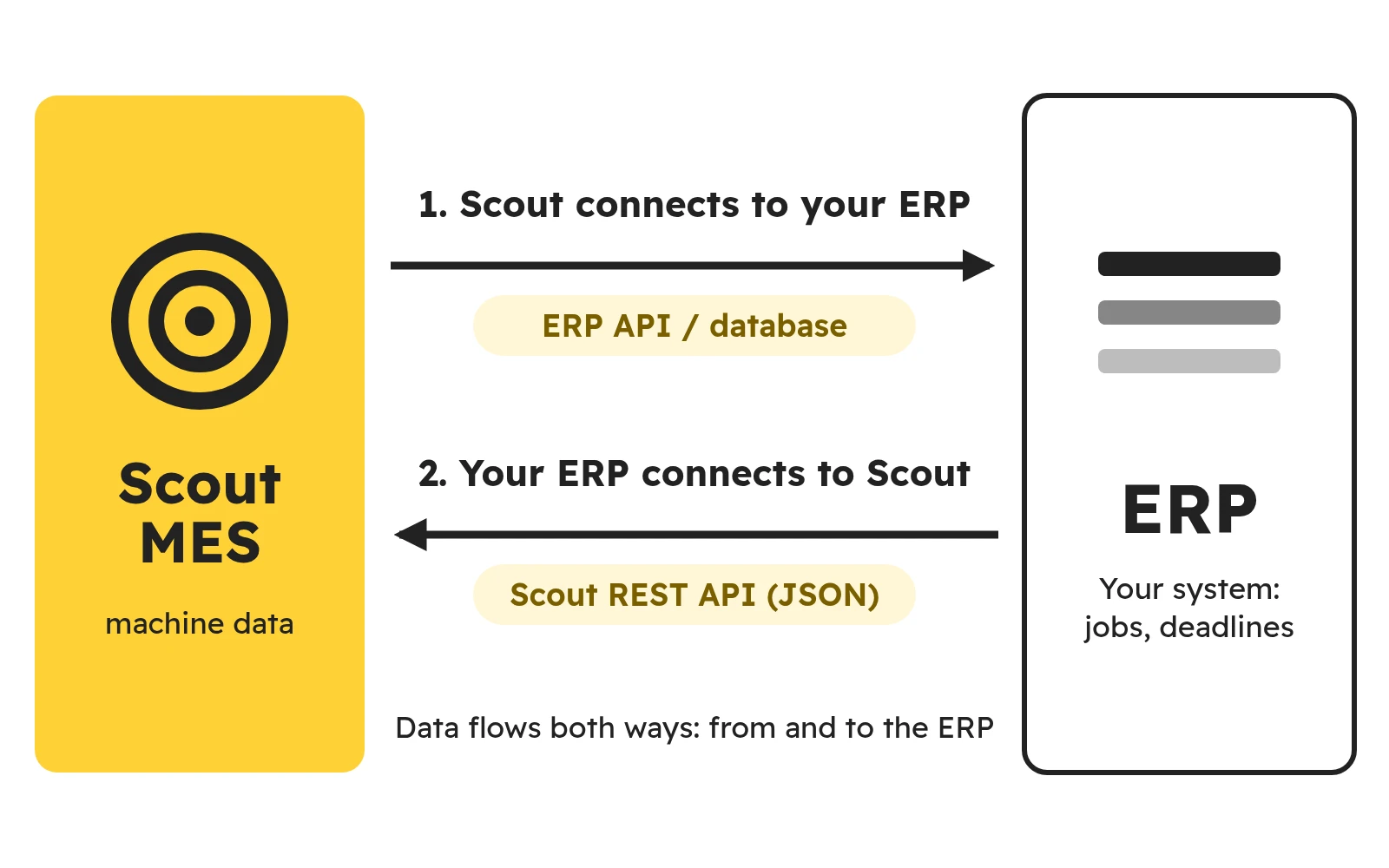
Scout connects to your ERP
Scout itself fetches data from your ERP and sends data to it, e.g. it takes the current list of jobs for the operator panel. We connect through your ERP’s API or through its database, depending on what the system offers. We adapt to your ERP, not the other way round.
Your ERP connects to Scout through a REST API
If you prefer your ERP to ask Scout for data, we provide a REST API (JSON). Your ERP vendor or IT department gets documentation from us, and we agree the API scope before the implementation.
Data usually flows in real time, periodically or on demand – from and to the ERP. If your system works that way, the exchange can also go through files.
What data we exchange with your ERP
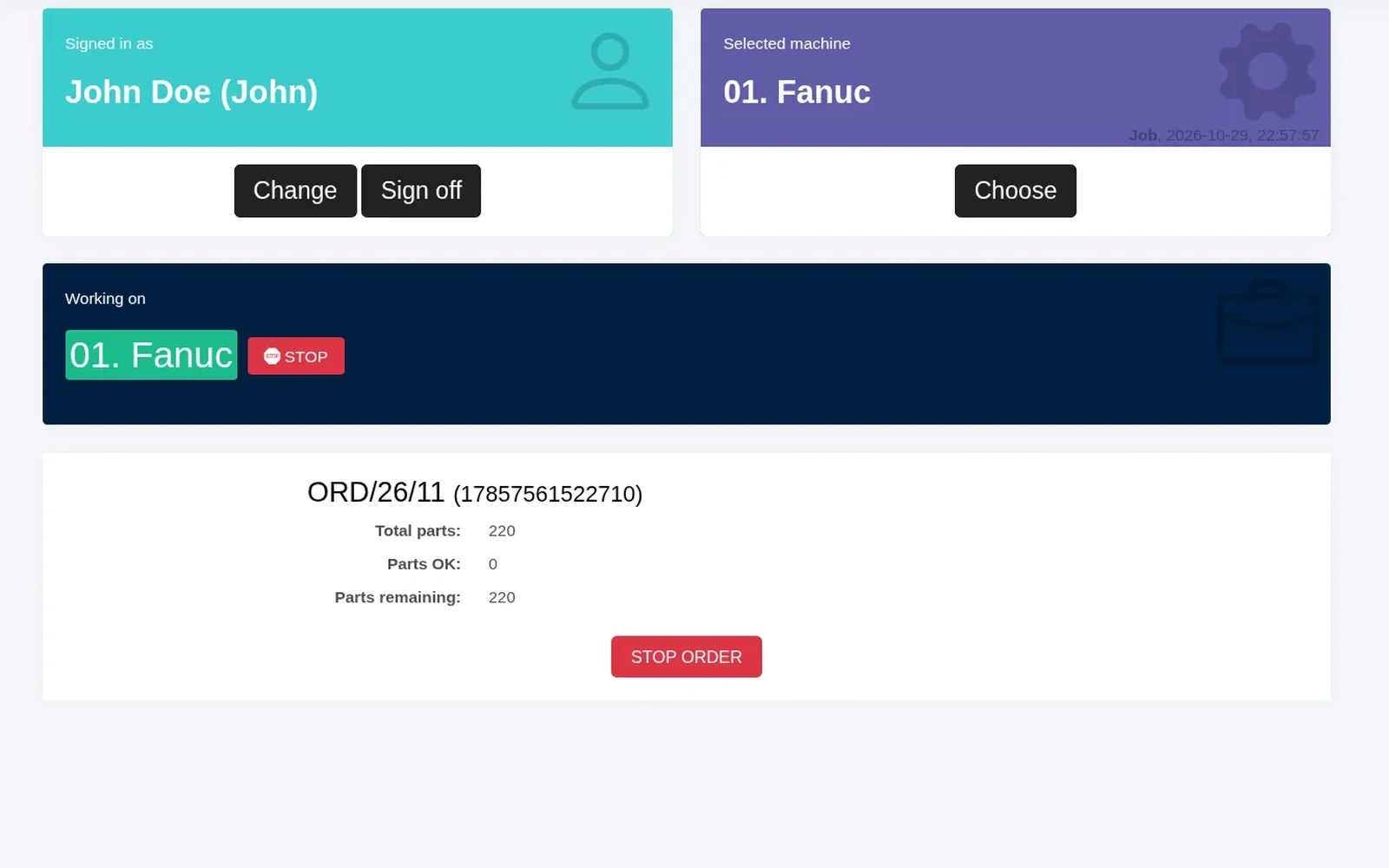
We agree the scope for your company before work starts, because we prepare every integration individually for the customer’s system. Most often it covers:
- Jobs. The operator selects a job from the ERP list in the operator panel instead of copying the number from a sheet of paper.
- Job start and stop. The start and end of a job marked on the shop floor are visible in the ERP.
- Employee. You know who works at the machine and on which job.
- Machine working times. You can compare the real times from the machines with the standard in your ERP.
- OK and NOK parts. The number of good and defective parts from the operator panel.
- Downtime and machine states. Job, idle, alarm – straight from the control.
Systems we have integrated Scout with
We have already integrated Scout with the Progress, Comarch and Streamsoft ERP systems. We prepare each integration individually, because every ERP and every company works differently.
Besides ERP, we also connect Scout with other company systems, e.g. a maintenance management system (CMMS).
How we prepare the integration
- Talking about the data. We agree what data should flow, in which direction and how often, and who on the ERP side is responsible for the connection.
- Choosing how to connect. Scout connects to your ERP through its API or database. The opposite direction is also possible: your ERP connects to Scout through our REST API.
- Scope and cost before we start. Integration is work outside the subscription. Before work starts, we estimate the cost and agree the scope with you.
- Implementation. Preparing the integration usually takes about 1–2 working days. We test it on your data and switch it on.
As the authors of Scout, we know the system inside out, so MES ERP integration is done by the same team that develops the system.
Without integration: jobs from the schedule and Excel files
ERP integration is not required to get started. Scout collects data from the machines from day one, and you can handle jobs and the plan without an ERP:
- Jobs from the schedule or typed in. In the operator panel, the employee selects a job from the schedule or types it in.
- XLSX import into the schedule, e.g. shift staffing and planned offline time, so that they do not lower the calculated efficiency.
- XLSX import into static pages, e.g. company news shown on a TV on the shop floor.
- XLSX export of historical data with the columns you choose, and of the machine heat map in colour.
What you gain
- No retyping. The job number and working time do not pass through a sheet of paper or a spreadsheet.
- The same data in the ERP and on the shop floor. The planner and the shift supervisor look at the job from one source.
- Real times instead of assumed ones. Times from the machines go back to the ERP, so you base standards and quotes on facts.
- Integration made to measure. We connect only what you need, in the direction that suits your ERP.
- The same in the cloud and on your own server. Integration works the same way in the SaaS and on-premises versions.
Frequently asked questions
We have already integrated Scout with Progress, Comarch and Streamsoft ERP. We prepare each integration individually for the customer’s system, because every ERP is different. In a consultation we will check what your ERP offers and which way of connecting will be simpler.
Both are possible. Scout can fetch data from your ERP and send data to it – through the API or the ERP database, depending on the system. Or the other way round: your ERP connects to Scout through a REST API (JSON) that we provide for you.
Most often jobs, job start and stop, the employee at the machine, machine working times, OK and NOK parts, downtime and machine states. Data flows in real time, periodically or on demand, and through files if needed. We agree the exact scope before work starts.
Yes. If your ERP is to connect to Scout, we provide a REST API (JSON) and give the documentation to your ERP vendor or IT department. We agree the API scope before the implementation.
Preparing the integration usually takes about 1–2 working days. Before work starts, we agree the scope and estimate the cost, so you know what you are agreeing to.
No. Integration is work outside the subscription, and we agree its scope and cost with you before work starts. Subscription prices are on the pricing page.
Yes. ERP integration works the same way when Scout runs on a server in your company as in the cloud SaaS version.
Yes. Scout collects machine data without an ERP. The operator selects jobs from the Scout schedule or types them in, and you can import shift staffing and planned offline time from an XLSX file. You can add the integration later.
Let’s talk about your ERP
Tell us what you expect from MES ERP integration and what data should flow between Scout and your system.